Showing posts with label Social Media. Show all posts

Monday, 14 February 2011

IMPORTANT INFORMATION on Facebook Pages for Admins!

Facebook Pages are changing their layout and how the page admins work. The official changeover date for all Facebook Pages will be 10 March  2011

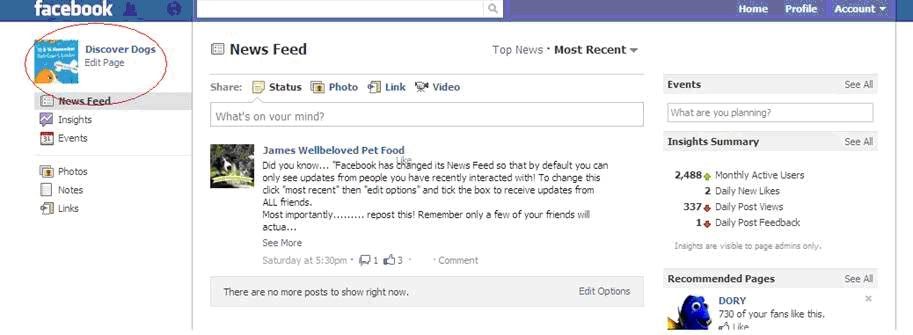
As below I have included an example Page so you can see the new layout. It’s exactly the same as the new personal profile layout, with no tabs and all the navigation on the left hand side under the profile pic (I have circled in green). The admins in the top right section only appear to admins, so don’t worry about people you don’t know being able to contact you.

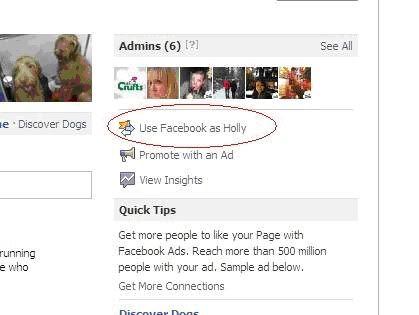
The main change is that you can choose to use Facebook as your chosen page profile or yourself. So you must be careful to remember to select to “use Facebook as <page name>” as I have circled in red on the top right under admins.


Why have I suddenly got lots of new notifications on my profile?

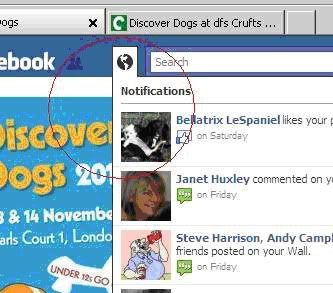
Once you click and switch over, in this case to be Discover Dogs, all you notifications etc will change to be that of the page – as I have circled in red below, it will change to likes and notifications, so you can see all new likes and you can keep a note easier of people commenting on your pages. When you switch over first it may come up with lots of likes etc, for etc if you have 8k fans you will suddeny have 8k likes, but the next time you log in it will be just the most recent.


Can I now comment on other pages as another page admin?

Yes!  You can also comment on other pages as that chosen page – as below I have commented as Discover Dogs on The Kennel Club.
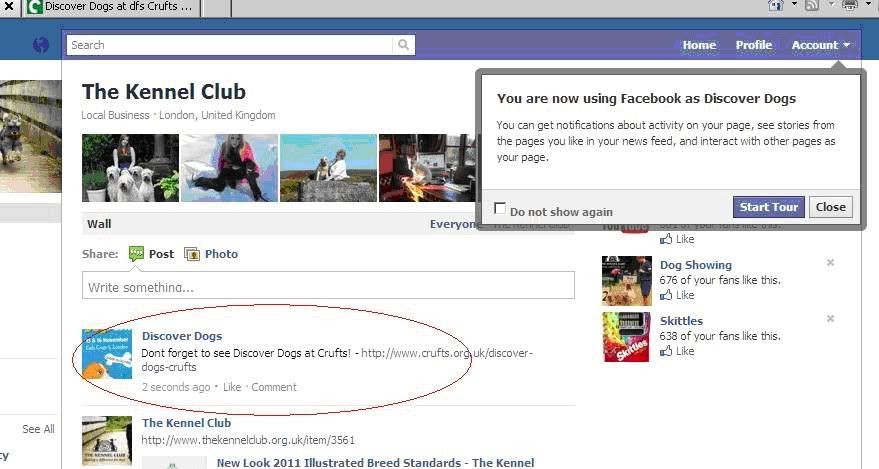

So please all be aware what admin you are linked into for what page, it will be great for commenting on other pages not as yourself, but you need to be careful you don’t get them mixed up – but don’t worry you can’t go writing on your friends posts etc as that page, as your home page will completely change also as below.

How do I change back to my own profile from a new Facebook Page admin?

When you want to go back to “being you” just go back to the page you are in (as above in red) and click on the link which says “Use Facebook as <your name>”

Please if you have any questions please just ask below an I'll try and help!

Sunday, 16 January 2011

The basics to starting a successful blog


Anyone can start a blog. It's straight-forward and, in a lot of cases, free. "Blog" is an abbreviated word for weblog, a web-based journal in which people can publish content on the Internet. It is a very powerful tool and now even Google can rank blogs higher than website content, so it is now very important part of your online strategy. It is also a great idea to have a blog if you want to contact other bloggers, being “in the mix” can help break down a lot of barriers but can also help you understand how to start and develop relationships with them.  

  1. Find a decent blogging provider that appeals to you. The most popular providers include LiveJournal, Blogger, WordPress, Xanga and Webs. These sites are pre-made with templates and push-button publishing that don't require much technical know-how.
  2. Choose a name. The name of your blog should say what your blog is about, think about keywords for search, but also don’t pick a fun, silly name if your blog is of serious content or vice versa. It should be short and easy for people to say and remember.
  3. Write content. Decide what your blog is about and stay on topic, and write about what you know and keep it current (old news is not good news).
  4. Think Keywords.  If your goal is to increase visibility, make sure you include related keywords in the title of the blog and in the main body of your copy. The title should be used to attract interest, and no longer than 10-12 words. If you are writing about news then think of what people would be searching or if you are writing a “How To” blog then using questions is great for search engine optimisation.
  5. Promote your blog. Before you promote your blog you want to make sure you have enough content on there. You want to ensure you have at least 10 blog posts. Once you have sufficient content you need to immerse yourself within forums and other blogs, leave helpful comments and or answer comments using the name from your blog as your username and also as your sign off. Make sure you don’t just post “selling” your blog or you will just annoy people, you need to gain and build trust within the environment and then people with come to you directly.